Best Podia Alternatives for Digital Product Sellers
In this article
Podia’s cheapest plan still takes 5% of every sale.
That surprises many sellers who remember Podia as a no-fee platform. Payhip, Gumroad, Ko-fi, Thinkific, and Teachable each fix a different Podia gap: price, tax handling, traffic, or course depth. Lemon Squeezy, once a sixth option, has closed to new sign-ups. Here is how they compare.
| Platform | Fees | Traffic | Best for | Payout |
|---|---|---|---|---|
| Podia | Mover $42/mo + 5%; Shaker $84/mo, 0%; Earthquaker $150/mo, 0% | No marketplace listed; you bring the buyers | Creators who want courses, downloads, email, and community in one dashboard | Through Stripe; PayPal on Shaker and up |
| Payhip | Free + 5%; Plus $29/mo + 2%; Pro $99/mo, 0% | Payhip Marketplace listing | Sellers who want every feature on a free plan | Immediately after each sale |
| Gumroad | No monthly fee; 10% + 50¢ direct; 30% on Discover sales | Discover marketplace | Sellers who want zero upfront cost and built-in discovery | Direct deposit or PayPal, varies by country |
| Lemon Squeezy | Closed to new sign-ups; stops processing 31 Mar 2027 | None | Existing sellers only; new sellers look at Gumroad or Stripe Managed Payments (supported countries) | n/a |
| Ko-fi | Free + 5%; Gold $12/mo, 0% | Creator page and feed | Tips, memberships, and a simple shop | Check Ko-fi’s payout settings |
| Thinkific | Start $82/mo billed annually ($109 monthly) | None | Course creators who need quizzes and certificates | Check Thinkific’s payout terms |
| Teachable | Starter $29/mo annual + 7.5%; Builder $69/mo annual, 0% | None | Course sellers who want mobile student apps | Check Teachable’s payout terms |
Per each platform’s published pricing page, read in November 2026. Fees change, so verify before you commit. Stripe or PayPal processing fees apply on top of every row. Payout timing for the rows marked “check” was not confirmed on public pricing pages. Lemon Squeezy’s status is from its own notice, read 17 November 2026.
How Much Does Podia Really Cost Compared to Its Alternatives?
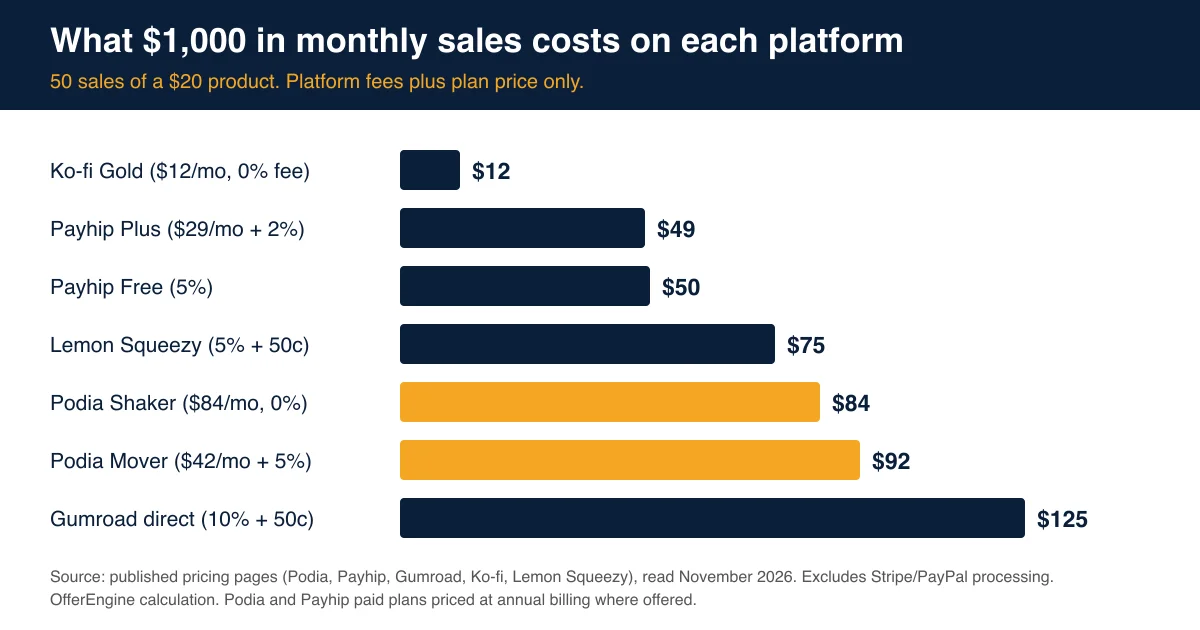
Podia’s Mover plan costs $42 a month billed annually and charges a 5% transaction fee, per Podia’s pricing page. The Shaker plan costs $84 a month with no Podia fee. On $1,000 in monthly sales, Mover costs $92 and Shaker costs $84, before Stripe or PayPal processing.
Podia is a platform that bundles online courses, digital downloads, coaching, community, email, and a website builder into one subscription. Podia says more than 15,000 creators run their business on it, and every plan starts with a 14-day free trial that needs no credit card.
The catch sits in the plan ladder. Here is what each tier includes, per Podia’s pricing page:
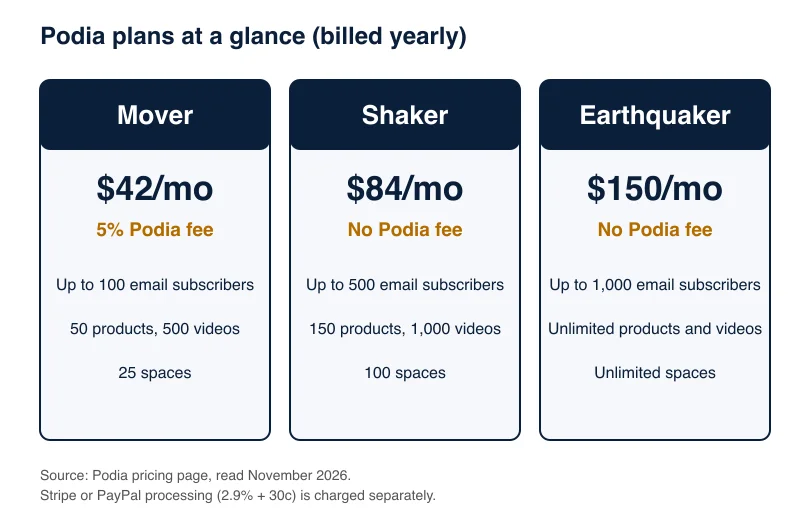
Mover caps you at 100 email subscribers and 50 products. Shaker lifts you to 500 subscribers and 150 products, and adds affiliate marketing, upsells, and PayPal. Earthquaker removes the product cap.
Do the math on the two lower plans. Mover costs $42 plus 5% of sales. Shaker costs $84 flat. They break even at $840 a month in sales ($42 divided by 0.05). Below that, Mover is cheaper. Above it, you pay more for the cheaper plan.
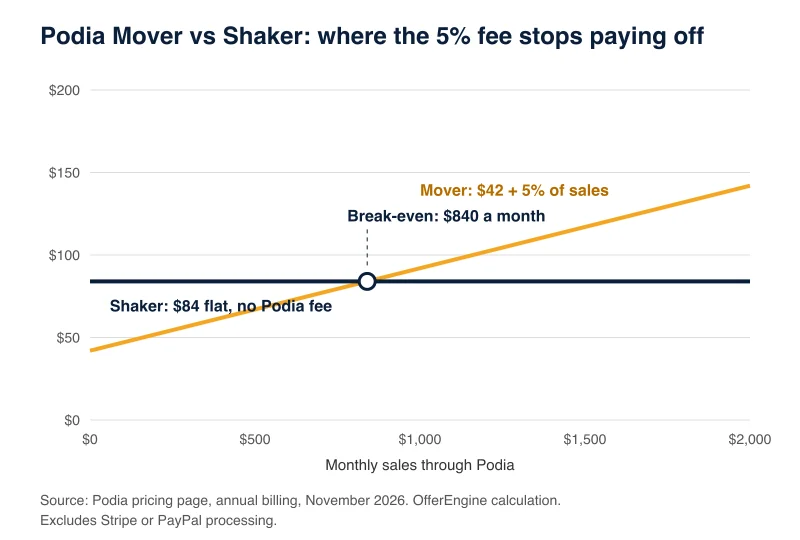
That is our calculation from published prices, not a Podia figure. It also shows the real problem. A seller who earns $300 a month from printables pays $57 on Mover, which is 19% of revenue. For that seller, a free plan elsewhere can be the better first step.
Is Payhip the Best Podia Alternative for Low-Volume Sellers?
Payhip’s Free Forever plan costs $0 a month with a 5% transaction fee, per Payhip’s pricing page. Plus costs $29 a month with a 2% fee, and Pro costs $99 a month with no fee. Every plan includes all features and unlimited products, so you never pay to unlock a tool.
Payhip is the closest match to Podia’s product range at the lowest entry cost. Its navigation lists digital downloads, online courses, coaching, memberships, and physical products, plus a store builder and email marketing. Payhip also says it collects and remits EU and UK digital VAT and US and Canadian sales tax for you.
The fee structure beats Podia Mover on a simple test. At $1,000 a month, Payhip Free costs $50 and Payhip Plus costs $49 ($29 plus $20). Podia Mover costs $92 for the same sales.
Payhip says it deposits your sales to you immediately after each transaction, per its pricing FAQ.
The honest trade-off: Podia’s dashboard bundles community spaces and a blog in a more polished package. Payhip is plainer. If you want a stripped-down store that sells files and courses cheaply, it wins. If you want a members’ community with topic-based spaces, Podia still has the stronger story. For a deeper look, read our Payhip alternatives guide and the Payhip vs Gumroad comparison.
Does Gumroad Beat Podia for Selling Digital Products?
Gumroad charges no monthly fee, but takes 10% plus 50¢ per sale on direct traffic and 30% when a new customer finds you through its Discover marketplace, per Gumroad’s pricing page. Since January 1, 2025, Gumroad is also the merchant of record and handles sales tax collection worldwide.
Gumroad wins on one thing: nothing to pay until you sell. A new seller can list a $5 template tonight and owe zero if it never sells.
It loses on volume. The same $1,000 in monthly sales (50 sales of $20) costs $125 on Gumroad direct. That is more than Podia’s $92 or $84.
So why consider it? Two reasons. First, tax. Because Gumroad is the merchant of record, it collects and remits tax so you do not register in every state or country. Second, traffic. Podia’s public feature list shows no marketplace. Gumroad’s Discover feed can bring buyers you did not find yourself, at a steep 30%.
A rule of thumb from our research: use Gumroad for your first few products, when zero upfront cost matters most. Move to a flat-rate plan once monthly sales settle above a few hundred dollars. Our Gumroad alternatives guide walks through that switch point.
Is Lemon Squeezy a Good Podia Alternative for Tax Handling?
Lemon Squeezy is no longer an option for new sellers. It has closed to new sign-ups and will stop processing transactions for all businesses on 31 March 2027, per its own notice (read 17 November 2026). The notice points businesses in supported countries to Stripe Managed Payments, a merchant of record built by the Lemon Squeezy team.
Lemon Squeezy was built for selling digital downloads, software, and subscriptions. Stripe Managed Payments handles tax compliance, fraud, disputes, and checkout for businesses in supported countries, but some Lemon Squeezy features, such as digital fulfillment and online storefronts, need separate tools.
Existing Lemon Squeezy sellers can keep accepting payments until 31 March 2027. Migration tooling launches on 2 December 2026, and the notice says the move usually takes 4 to 8 weeks.
Neither gives you a course player or a community the way Podia does. They are checkout and compliance tools, not all-in-one business hubs. If your product is a template pack, a font, a plugin, or a downloadable kit, Gumroad covers the basics. If you run cohort courses, look at Thinkific or Teachable below.
See our Lemon Squeezy alternatives guide for what to move to if you were planning on Lemon Squeezy.
Does this sound like your situation? Not sure which product or platform fits you? Take the free product quiz. Ten questions. Free. No pitch.
Should You Pick Ko-fi Instead of Podia?
Ko-fi’s free tier charges a 5% service fee on shop sales and memberships, per Ko-fi’s pricing page, while Ko-fi Gold costs $12 a month with a 0% platform fee. At $1,000 a month in sales, Gold costs $12 against Podia Shaker’s $84, before card processing.
Ko-fi Gold beats Ko-fi’s own 5% fee once you pass about $240 a month in sales ($12 divided by 0.05). Its features list tips, memberships, a shop for digital and physical products, and commissions.
That is also its limit. Ko-fi is a creator page, not a course platform: its public features list has no course builder, drip lessons, or certificates like those Podia advertises. Treat it as a storefront for downloads and a tip jar for fans, not a place to run a 12-week course.
Ko-fi fits sellers whose audience already follows them on Instagram, YouTube, or Twitch and wants a simple link to buy a $10 pack. Our Ko-fi alternatives guide covers when to outgrow it.
Do Thinkific or Teachable Make More Sense for Course Sellers?
Thinkific’s Start plan costs $109 a month, or $82 a month billed annually, per its pricing page. Teachable’s Starter plan costs $39 a month ($29 annual) with a 7.5% fee, and its Builder plan costs $89 a month ($69 annual) with no transaction fee, per Teachable’s pricing page.
Both are course-first. Podia handles courses well for a beginner, but they go further on structure.
Thinkific lists unlimited courses, live cohorts and coaching, quizzes, assignments, certificates, bundles, upsells, and payment plans on its Start plan. If your course needs graded work or a completion certificate, that is the gap Podia leaves open.
Teachable lists iOS and Android student apps, upsells and cart recovery, and global payments and taxes on every plan. Starter caps you at five products and charges 7.5%, so Builder is the real entry point at $69 to $89 a month.
Both cost more per month than Podia Mover or any free-plan option here. Pick them only if course delivery is the product. If you sell templates and printables, you pay for features you will not use. Our Teachable alternatives guide covers the course-platform field in detail.
Which Podia Alternative Should You Choose?
Choose Payhip for the lowest-cost all-in-one replacement, Gumroad for tax handling, Ko-fi for a simple shop at $12 a month, and Thinkific or Teachable for serious course delivery. Stay on Podia if you use its community, email, and website tools together.
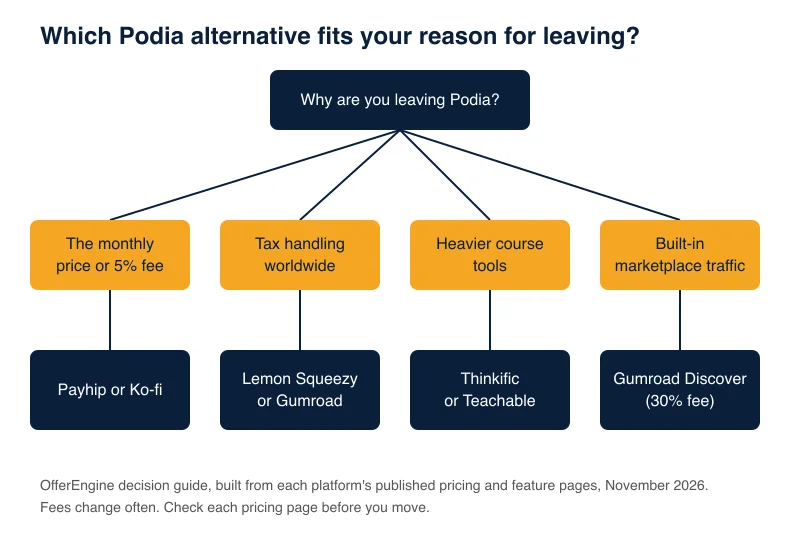
Decide by your reason for leaving:
- The fee or monthly price: Payhip Free or Plus, or Ko-fi Gold.
- Sales tax and compliance: Gumroad, a merchant of record, or Stripe Managed Payments if your business is in a supported country. Lemon Squeezy has closed to new sign-ups.
- More course structure: Thinkific or Teachable.
- Built-in marketplace traffic: Gumroad Discover, knowing the fee is 30%.
- Everything in one place: Stay on Podia and compare Shaker against Mover at your real sales volume.
One migration note. Podia offers migration help for products moving onto it: up to 50 on Mover and 150 on Shaker and Earthquaker, per its pricing page. Check the new platform’s import tools before you leave. Export your customer emails and download your files before you cancel, and expect to rebuild quizzes and email automations by hand.
Also test with a real product before you commit. Every paid platform here offers a trial or a free tier, and Podia gives 14 days with no card. Set up one product on your shortlist and run one test checkout.
Frequently Asked Questions
What is the best alternative to Podia?
Payhip is the best all-around alternative for most digital product sellers. Its free plan charges 5% with all features and unlimited products, and its $29 Plus plan cuts the fee to 2%. At $1,000 in monthly sales, Payhip costs $49 to $50 against Podia Mover’s $92, per published pricing.
Does Podia charge transaction fees?
Podia’s Mover plan charges a 5% transaction fee on top of its $42 monthly price (billed annually). The Shaker and Earthquaker plans, at $84 and $150 a month, charge no Podia fees. Stripe or PayPal still charge their own processing fee, typically 2.9% plus 30¢, per Podia’s pricing page.
Is there a free alternative to Podia?
Yes. Payhip’s Free Forever plan, Gumroad, and Ko-fi’s free tier have no monthly fee. They charge per sale instead: 5% on Payhip and Ko-fi, and 10% plus 50¢ on Gumroad direct sales, per each published pricing page. Lemon Squeezy used to belong on this list but has closed to new sign-ups.
When does Podia’s Shaker plan beat the Mover plan?
Shaker beats Mover once you sell more than $840 a month through Podia. Mover costs $42 plus 5% of sales, while Shaker costs $84 flat. At $2,000 a month, Mover costs $142 and Shaker still costs $84. This is our calculation from Podia’s annual-billing prices.
Can I move my courses and customers off Podia?
You can export your own files and customer emails, but plan for manual rebuilding. Video, files, and written lessons carry over most easily. Quizzes, email automations, and community spaces usually need to be recreated. Check the new platform’s import tools first, because Podia’s documented migration help covers moving products onto Podia.
Keep Reading
What to Do Next
Choose the path that fits where you are right now.
Score Your Ideas
Answer a few questions about your skills, audience, and goals. Get a product type and selling platform matched to you.
Take the QuizGet Weekly Tactics
One tip, one tool, one case study. Every Tuesday.
Free. No spam. Unsubscribe anytime.